
Every beneficiary counted once.
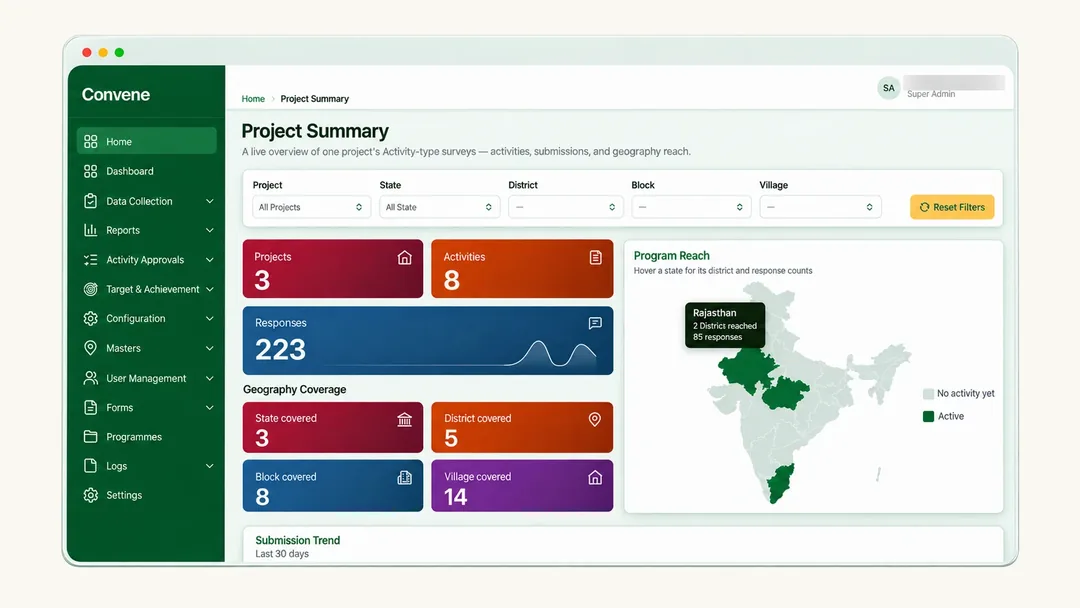
Every programme in one view.
Convene is a self-configurable, open-source MIS that brings programmes, beneficiaries, field data and reporting into one place. Field teams keep working with no network, and the data stays on a server in your name.
Connecting the work that creates impact.
Count each person once
Duplicate checking is built into registration, so each person has one ID across every theme and donor.
Work offline
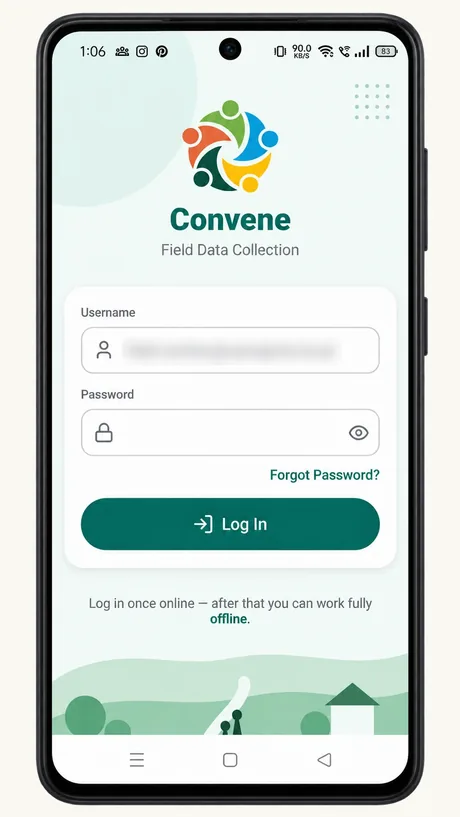
Field staff capture data in multiple Indian languages on low-end Android phones, with or without a signal.
Track everything
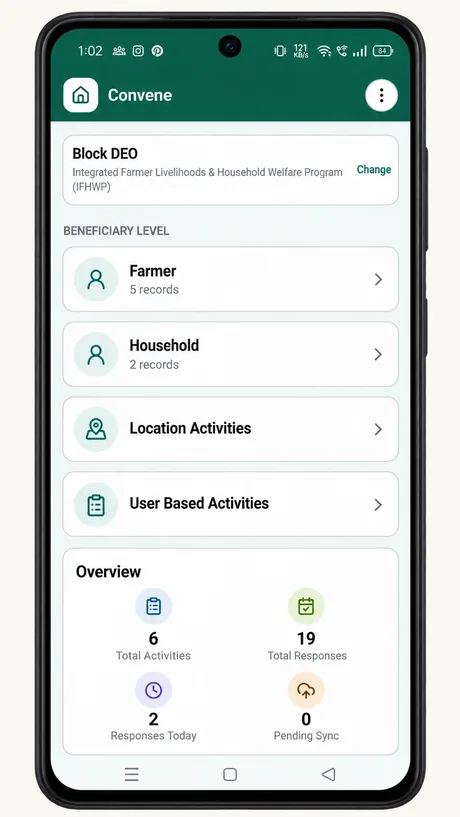
Programmes, activities, targets, budgets and indicators sit together in one place.
Reports in minutes, not weeks
Donor-ready reports come straight from the data your team already entered, with nothing to compile. Dashboards refresh every day.
Configure yourself
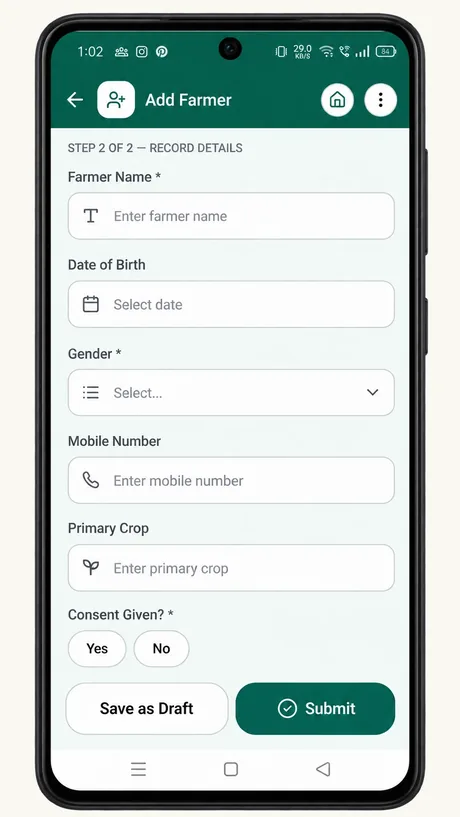
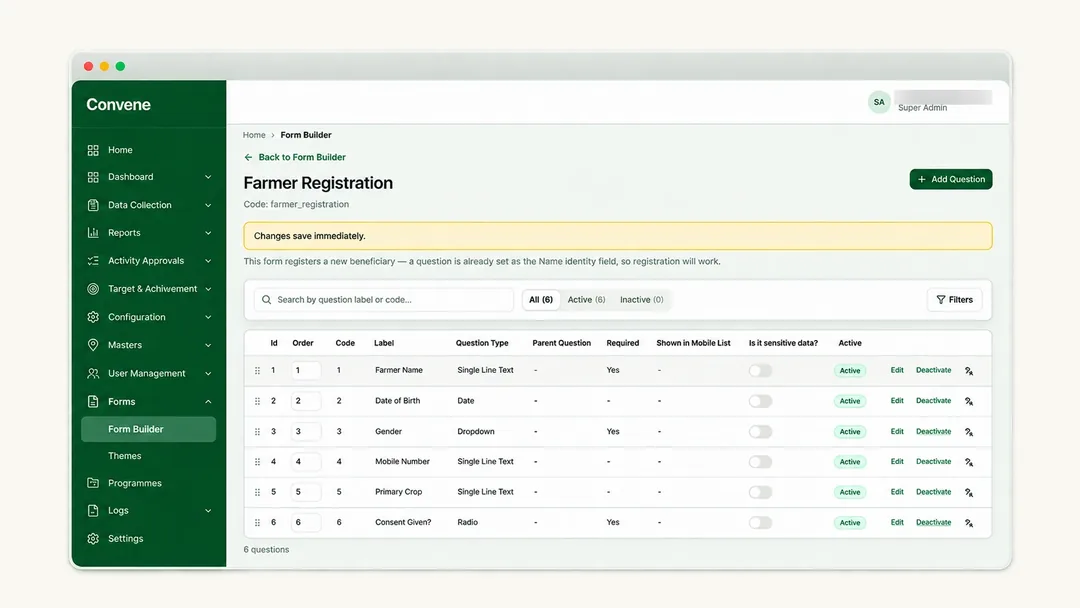
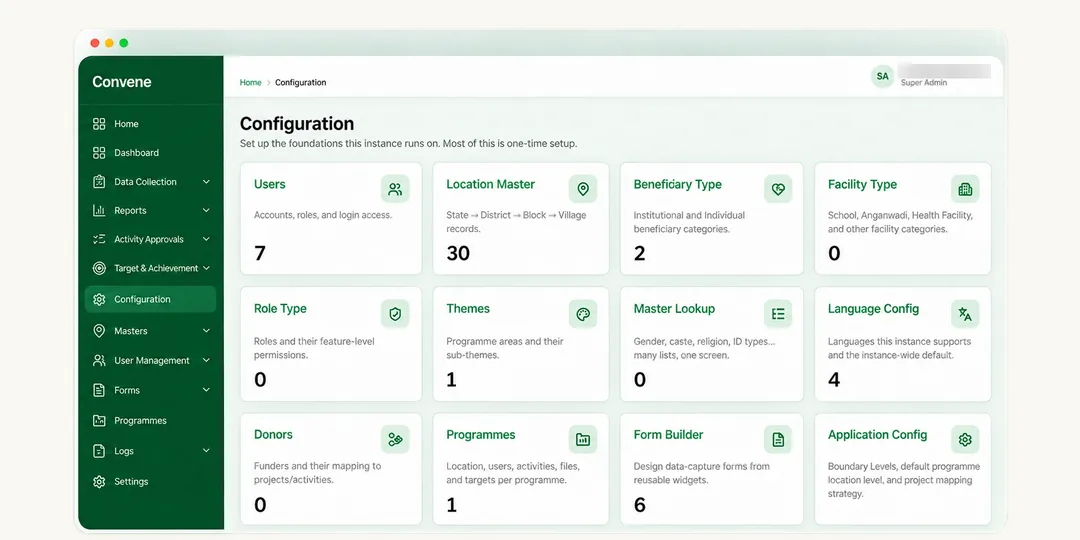
Set up forms, your lists of villages, programmes and staff, and who sees what, with no code.
Twelve modules in one product.
- Masters and geographyYour villages, programmes and staff lists, set up once.
- Roles and accessDecide who sees and edits what, down to their own villages.
- Beneficiary and household registryOne record per person and household, with duplicate checks.
- Groups and federationsSelf-help groups, committees and federations, with their members.
- Form builderBuild surveys and registers yourself, with skip logic and checks.
- Programme and activity trackingProgrammes, projects and activities, linked to the people served.
- Target vs achievementSet targets and see progress against them.
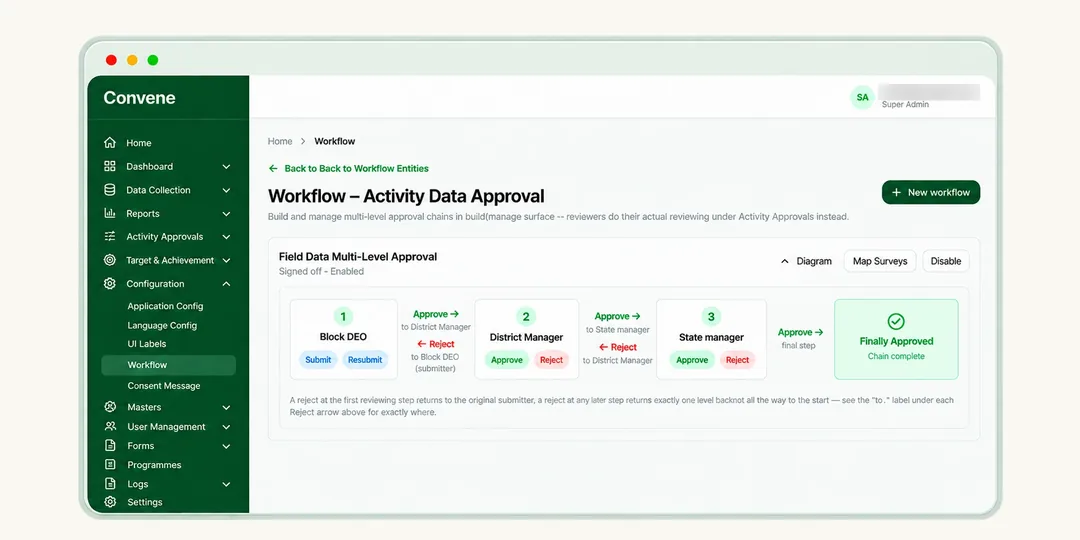
- Approval workflowsEntries go to a supervisor for review before they count.
- ReportsDonor-ready reports from data already entered.
- DashboardsA daily picture of your programmes by place and project.
- Offline Android appField staff collect with no signal, and it syncs later.
- Excel importBring in your existing lists from Excel.
24 years of building MIS for non-profits.
Mahiti has worked with 180+ civil society organisations across India, from multi-state organisations to small community groups, in livelihoods, health, child rights, watershed and agriculture. We built each Convene module from ten of those MIS engagements, so it matches how non-profits already run their programmes.

Five people. A shared purpose. A stronger tomorrow.
Five perspectives convening around a common goal. Bringing field teams, programme teams, M&E, leadership and donors together around the same programme goals, data and decisions.
Field staff
Records visits and registrations on a phone, even with no signal.
Programme manager
Sees what is done and what is due, by village and project.
M&E team
Tracks targets and pulls reports without compiling registers.
Leadership
Sees every programme in one view.
Donors / CSR
Receives reports drawn from the same data the team entered.
Move your programme out of registers.
Convene gives programme, M&E and field teams one shared record of who you serve, what you did and where. You keep ownership of the software and the data.
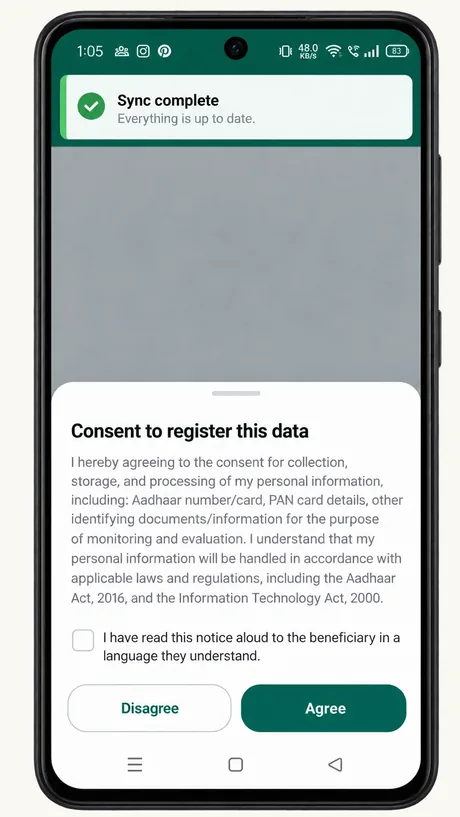
- Read aloud to the beneficiary, then agreed on the phone.
- One ID per person, with duplicates checked.
- Field staff fill in forms with or without a signal.
- Records upload when the phone finds a network.
- Each level checks and approves, or sends back.
- Progress by place and project, refreshed every day.
- Decisions for your team, reports for donors and CSR partners.
The problems every non-profit already knows.
Scattered data
Excel sheets, Google Forms, paper registers and donor-specific tools, with no single source of truth.
No real visibility
No structured system shows what is happening across programmes and geographies.
Duplicate beneficiaries
Each theme or donor uses its own ID, so the same person is registered again and again.
Slow, backdated reporting
Monthly and quarterly reports compiled from registers are slow, error-prone and already out of date.
Connectivity breaks the field
Data collection stalls the moment a field team loses network coverage.
Six reasons non-profits choose Convene.
Built for DPDP compliance
Convene runs on a server in your non-profit's name, with consent capture and audit trails built in.
Offline-first
Field staff keep working with zero connectivity. Data syncs safely when they are back online.
Configure it yourself
Set up forms, lists and user roles yourself. Changing a survey mid-programme needs no developer.
Under ₹4 per beneficiary a year
For an average non-profit, annual maintenance works out to less than ₹4 per beneficiary.
No licence fees
The software is free. You pay only for deployment and support.
Your voice counts
Non-profits using Convene shape what gets built next. Share field feedback and join the monthly community call.
Share your feedback →Programmes Convene was shaped by.
| Programme area | A first form to build | What it tracks |
|---|---|---|
| Health management | Home visit record | Visits, referrals and follow-ups per household |
| Case management | Case file | Assessments, services and approvals for each individual |
| Child rights | Child protection register | Children, risks, interventions and outcomes by village |
| Livelihoods | Self-help group and federation register | Groups, members, savings and enterprise support |
| Agriculture and watershed | Farmer and plot register | Households, plots, structures and yields by micro-watershed |
Four steps to a pilot.
Book a 30-minute live demo
See Convene with data that looks like yours.
Walk through your current reporting
We map your registers, forms and donor reports to Convene's modules together.
Pick a pilot starting point
Start with health management or case management, the two most common entry points.
Go live with a pilot
The standard path takes about four weeks. When your data and team are ready, a pilot can go live in 24–48 hours. See what's needed
What non-profits ask us.
Which languages does the field app support?
Multiple Indian languages. Tell us yours when you book a demo.
Can it produce our donors' report formats?
Yes. Convene comes with standard reports for beneficiaries reached, activities and progress against targets, by place and project. If a donor needs its own format, we build that report for you as a custom report, quoted separately. Bring your donor formats to the demo.
We keep everything in Excel today. What happens to that data?
You bring your beneficiary, village and programme lists into Convene with ready-made import templates, and Convene checks them for errors as they come in. Past activity records can be archived or imported for an extra fee.
Can we leave later and take our data?
Yes. Convene runs on a server in your non-profit's name, so the data is always yours.
What devices do field staff need?
Ordinary Android phones, including low-end ones. There is no iPhone app.
What does a 24–48 hour pilot need?
Your lists already filled into our import templates, a programme template that matches your work, one admin plus 2–5 field staff on site on the day, a network connection, and Android phones. If any of these is missing, we follow the standard path of about four weeks.
Personal data needs care at every step.
Convene stores names, locations and sometimes health details of the people you serve. Keep access limited to the staff who need it, collect only what your programme needs, and use the built-in consent capture and audit trails to meet the Digital Personal Data Protection Act.
One deployment fee, then low yearly maintenance.
You pay once to set Convene up for your non-profit, then a yearly fee to keep it maintained and supported. The software itself is free.
What you pay
Launch price: from ₹1,00,000, down from ₹2,00,000.
one-time
- Convene set up on a cloud server in your non-profit's name
- Your forms, lists and user roles configured with you
- Self-serve import of your beneficiary, village and programme lists
- One training session, plus the user manual and video training
20% a year
of the deployment fee
- Updates and security fixes, applied for you
- Support from the team that built Convene
- For an average non-profit, under ₹4 per beneficiary a year
No IT team needed
We set Convene up on a cloud server in your non-profit's name and keep it updated. You pay the hosting provider directly, and we recommend the plan.
Custom reports and extra modules
We build reports in your donors' exact formats, and add modules such as HR and leave, GIS maps, advanced analytics and integrations. Each is quoted separately, as is importing past activity records.
Have your own IT team?
Convene is open source and free to run yourself. See the developer guide →
Get a quote for your non-profit.
In a 30-minute demo, we look at your programmes and data and give you a firm price.
Write code that reaches every last mile.
Convene is a monorepo: a Laravel API, a React web admin and a React Native app sharing types and form schemas. Your first pull request can land in an afternoon.
- Try the app on low-end Android phones in low-signal areas and report what breaks.
- Fix bugs and build features in the API, the web admin and the Android app.
- Bring the app and its guides to more Indian languages.
- Shape forms, indicators and reports from real programme work.
- Fund features and deployments that every non-profit then shares.
How the pieces connect.
apps/mobileapps/webapps/apishared-types for TypeScript types, widget-schema for the form widgets both apps render, and ui-tokens for theming and non-profit branding.Running locally in four commands.
You need Node.js 22.11+, PHP 8.2+ with Composer, and MySQL or MariaDB. Android Studio or Xcode only if you work on the mobile app.
npm install
cd apps/api
composer setup   # set DB credentials in .env first
composer devnpm run web:dev
npm run mobile:start
npm run android --workspace apps/mobile
npm run ios --workspace apps/mobilecd apps/api && composer test
npm run web:lint
npm run mobile:lintHost Convene on your own server.
Convene is free to run yourself. It works on shared hosting with cPanel or Plesk, or on a virtual machine.
| Setting | Shared hosting | Virtual machine |
|---|---|---|
CONVENE_HOSTING_MODE | shared | vm |
CONVENE_DEFAULT_DISK | local_storage | local_storage or s3_storage |
CONVENE_QUEUE_MODE | cron-batch or sync | worker |
From issue to merged.
Pick or open an issue
Comment that you are taking it. For a larger change, start a discussion first so maintainers can help shape it.
Branch from main
Fork the repository and create a branch named for the change, such as
fix/sync-retry.Sign off every commit
Use
git commit -sto confirm you have the right to contribute the code. You keep the copyright in your work.Open a pull request
Describe what changed and how you tested it. CI runs the tests and linters.
Review and merge
A maintainer reviews it, usually within three working days. One approval and passing checks are enough to merge.
Guides for every role.
Guides marked "planned" are open for anyone to write.
All guides
Install and set up
Requirements, local setup, configuration variables, tests and linting.
Read the README →Shared hosting
Deploy Convene on cPanel or Plesk without a dedicated server.
Read the guide →Governance
Who runs Convene, how decisions are made, and how that will grow with the community.
Read governance →Form builder guide
Question types, skip logic, validation and publishing a form to the mobile app.
User manual and video training
A full PDF manual and video-based training come with every deployment by Mahiti. Public versions are planned for the community.
Admin guide
Users and roles, geography setup, programmes and projects, exports.
Field staff guide
Installing the app, collecting offline, syncing, and fixing a failed sync. In English and Indian languages.
VM deployment
Running Convene with S3 storage and queue workers on your own server.
API reference
Authentication with Sanctum, endpoints and sync payloads.
Migrating your data
Preparing Excel sheets and registers for the import templates, and checking for duplicates.
DPDP compliance guide
Using consent capture, audit trails and access roles to meet the Digital Personal Data Protection Act.
Want to write one of these? See how to contribute docs →
Where Convene people meet.
Questions, ideas and decisions happen in the open, so the answer to your question helps the next non-profit too.
Five people. A shared purpose. A stronger tomorrow.
Five perspectives convening around a common goal. Bringing field teams, programme teams, M&E, leadership and donors together around the same programme goals, data and decisions.
Field staff
Records visits and registrations on a phone, even with no signal.
Programme manager
Sees what is done and what is due, by village and project.
M&E team
Tracks targets and pulls reports without compiling registers.
Leadership
Sees every programme in one view.
Donors / CSR
Receives reports drawn from the same data the team entered.
Ways to connect
WhatsApp channel
Release news, call invites and field tips for non-profit teams.
Chat
A real-time space for contributors to pair and ask quick questions.
| Event | Who it's for | Format | How often |
|---|---|---|---|
| Demo hour | Non-profits exploring Convene | 45 minutes online, English and Hindi | Monthly |
| Bring your form clinic | M&E and programme staff | 2 hours, online or in person | Monthly |
| Community call | Everyone | Roadmap, releases, open questions. Recorded. | Monthly |
| Field app training | Frontline staff | Hands-on with the offline app | On request |
| Adopter show-and-tell | Non-profits and funders | Pilot non-profits present their setup | Quarterly |
Mahiti looks after Convene today, and decisions are made in public. How Convene is governed →
The first non-profits running Convene will be listed here.
Running a pilot? Tell us about it and we will feature your story.
Everyone is welcome.
We follow the Contributor Covenant. Report a concern confidentially through our contact form. Only the conduct response team reads these reports.
Report a concern →Every contribution counts, code or otherwise.
Field staff, translators, M&E teams and students all make Convene better.
Put Convene in the language of the field.
Help translate the mobile app and field staff guide.
Share a form template
Turn a form your non-profit built into a template others can import and adapt.
Test on real phones
Try the app on a low-end Android handset in a low-signal area and report what breaks.
Write a guide
Pick a planned guide from the docs page, or improve an existing one.
See planned guides →Host a clinic
Run a "bring your form" clinic for non-profits in your network, with materials from us.
From first contribution to maintainer.
Contributor
Anyone who reports a bug, answers a question, translates, writes docs, tests or sends code. No permission needed.
Maintainer
Reviews and merges changes, triages issues and plans releases. Contributors who help regularly and well are invited to join.
Not sure where to start?
Tell us a little about yourself and what you enjoy doing. We will reply with a first task that suits you.
Write to the Convene team.
Tell us who you are and what you need, and a person from the team will reply by email, usually within two working days.
- Book a 30-minute demo for your non-profit
- Join a "bring your form" clinic or the pilot cohort
- Offer to translate, test or write a guide
- Ask a question, or just say hello